Balsamiq Logo
Balsamiq Logo
Product
Features Balsamiq AI
Changelog
Use Cases
Customer stories
Pricing
Resources
Help Center Blog Balsamiq Academy Good Product Club
Log in Try it free
Try it free
  • Product
    • Features
    • Balsamiq AI
    • Changelog
  • Use Cases
    • Customer stories
  • Pricing
  • Resources
    • Help Center
    • Blog
    • Balsamiq Academy
    • Good Product Club
Log in Try it free
Editing UI elements
Help Center Product docs & FAQs Plans & Billing FAQs
Documentation
  • Getting started
  • Account Management
  • Creating and editing
    • Editor overview
    • Wireframing with Balsamiq AI
    • Prototyping with Balsamiq AI
    • Working with UI elements
    • Editing UI elements
      • Editing properties
      • Editing text
      • Using icons in text elements
      • Using find and replace
      • Transforming UI elements
      • Advanced UI elements (table, sitemap, tree pane)
    • Using images and icons
    • Linking boards together
    • Managing different versions with alternates
    • Reusing wireframe elements with components
    • Keeping projects clean and organized
    • Keyboard shortcuts
  • Sharing and collaborating
  • Integrations

Using icons in text elements

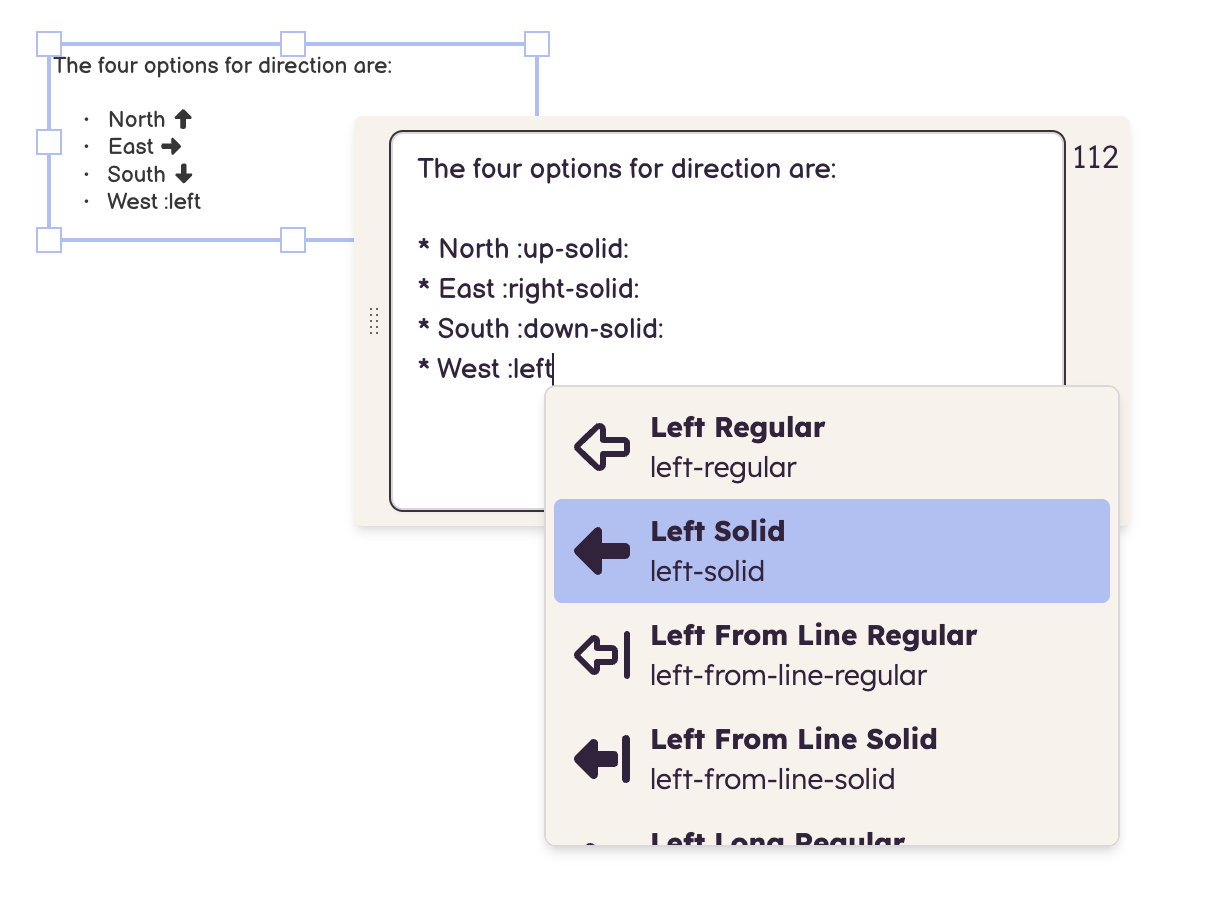
You can add icons anywhere in your text using the icon name enclosed in colons.

If you're not sure of the exact name of the icon, just type a colon then start typing an icon name. A drop-down menu will appear which matches your typing to the list of available icon names:

Balsamiq Logo
  • Features
  • Balsamiq AI
  • Pricing
  • Changelog
  • Balsamiq for Desktop
  • Balsamiq for Confluence
  • Balsamiq for Jira
  • Balsamiq vs other tools
  • Balsamiq Blog
  • Help Center
  • Changelog
  • Customer stories
  • Good Product Club
  • Balsamiq Academy
  • Server status
  • Research program
  • Slack community
  • Balsamiq for nonprofits
  • About us
  • Careers
  • Brand assets
  • Legal
GDPR Logo GDPR COMPLIANT SOC2 Logo SOC2 COMPLIANT

© 2008- Balsamiq · Privacy · Terms · Cookie Preferences